
Pardon me sir, have you any wang?
I've been playing games for years, all the way back to the Atari 2600 and even the venerable Odyssey2. But I never really paid attention to the bloops and bleeps that passed for music in these older games. It's embarassing to admit this, but my fascination with PC game music began with 3D Realms' forgettable and vaguely offensive 1997 game, Shadow Warrior.
Pardon me sir, have you any wang? |
|---|
The music in Shadow Warrior was a collection of uninteresting songs that did nothing but get in the way of the more useful combat sounds. Adding insult to injury, they were MIDI format. Back in the bad old days of 1997, most people owned basic soundblaster-class sound cards with MIDI playback that was one small step above a $9.99 Radio Shack synthesizer— in other words, painfully bad. The developers, to their credit, knew how things stood. They realized that most people would probably just disable the music, and included a funny little easter egg in the game. Upon disabling the music via the menus, you are treated to a little Lo Wang sound clip: "What matter.. you don't like music?"
We were playing a LAN game at the time, with the sound cranked. A bunch of guys overheard this little sound bite, and we practically died laughing. It was really funny; the one memory I have of that otherwise unremarkable game. I won't dig into the perverse psychology of making fun of your own game, but give George Broussard some credit. He's right. Most game music is just crap. A checkoff item. Can't have a game without music, right?
But this little inside joke, as innocuous as it was, made me stop for a second and think about what I was doing. Why was I disabling the music? I realized at that moment that I really did love game music— just not this music.
Part of that can be blamed on the limitations of MIDI. The advent of the CD-ROM as standard PC equipment circa 1996 was the defining moment in the history of PC game music. All of a sudden, the sky was the limit: anything music composers could dream up could be mastered onto the game CD as a standard audio track. And best of all, redbook audio sounded exactly as composed. Not just for gamers with high-priced sound cards, but for every gamer with a CD-ROM drive.
 Wicky-wicky wild wild west |
|---|
Which brings me to the other seminal event of 1997— John Romero's review of Outlaws , which he posted to the Ion Storm website. In the review, John waxes eloquent about the game's CD audio soundtrack. I believe his exact words were (as memory serves), "If you play with music disabled in Outlaws, I will personally come to your house and bitch-slap you." No, I'm not kidding. Yes, there was a time when John Romero was not an industry laughingstock. Regardless, John was right. Outlaws is a fantastic first person shooter. As testament to its greatness, there are active fan sites for the game to this day, over three years after it was released.
But what's most remarkable about Outlaws is how unique and effective the CD soundtrack is. It's a homage to classic western movie music; music you've probably heard subconsciously when watching a late-night TV showing of The Outlaw Josey Wales. But why watch Josey Wales.. when you can be Josey Wales? The music really took the game's immersion to the next level. And it didn't skimp, either, with two full CDs of fantastic western-themed songs.
Thanks to John Romero, Outlaws was the first truly great PC game soundtrack I encountered. From that point on, I was hooked. I couldn't help listening to every new PC game with a critical ear to see if it approached the greatness of Outlaws. I began keeping games I would otherwise give away or sell, based on the quality of their soundtrack.
But what seperates the great soundtracks from the also-rans? I began to formulate a couple rules based on experience.
Given my natural interest in the topic, it's only natural that the website I founded, GameBasement, would end up hosting a PC game music radio station sooner or later.
I get asked this question a lot: why PC games? Why not (insert favorite platform here)? Well, there are two reasons. First, I do almost all of my gaming on the PC, so it is the platform I am most familiar with. Second, there are literally dozens of web sites already broadcasting arcade, console, and music from other platforms. As far as I know, we are the sole PC-only game music broadcast in the entire world.
The other question that occasionally comes up is the legality of providing nearly complete game soundtracks in a radio broadcast. I believe this is covered under the "Fair Use" doctrine in US copyright law. "Fair Use" is a limitation to a copyright holder's rights. It allows others to use some or all of another's work under certain circumstances without the copyright holder's approval. There are four factors used to consider whether a use made of a copyrighted work is a "Fair Use":
I don't think any reasonable person would consider listening to the soundtrack as potentially damaging to sales of the game; it's a small fraction of a product created by a large number of people, not just musicians. The situation would be very different if we were broadcasting, say, a complete Ricky Martin album. In that case, the audio is the entire product!
The first task in setting up any radio station is generating a playlist of songs. For games, that means extracting the audio into the common currency of MP3. Unfortunately, every game approaches audio differently. There are three broad classes of music that all games will fall into: MIDI, digital mixing, and CD Audio.
Attempting to set up a radio station on a web server can be an unnecessarily complex endeavor. There's certainly no shortage of people trying to convince you to use their proprietary streaming software, such as Real's RealSystem, Microsoft's Media Server, and WinAmp's Shoutcast. Some of it is free; some of it costs thousands of dollars, and it's all complicated.
My philosophy is, when in doubt, keep it simple, stupid. With that in mind, I decided to forgo all the complicated streaming solutions and go with the most basic method: serving individual files via HTTP. We serve playlists for WinAMP and Windows Media Player. The playlists are simply text files, formatted as specified for each player, containing hundreds of standard URL links to songs.
Since this is a web-based project, cross-platform portability is a concern. Fortunately, MP3 files are universally supported on most platforms, as are the URLs used to serve the files. And WinAMP, at least, has clones such as MacAmp and XMMS (for Linux) that can parse the playlist files. So we're set on that front.
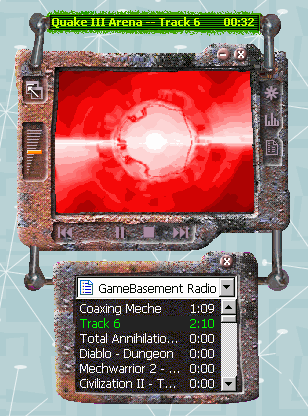 Windows Media Player |
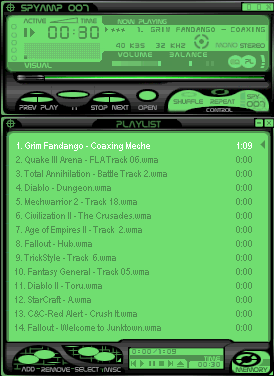 WinAmp |
The other major issue was bandwidth. All the music tracks are standard 128kbps (or higher) MP3 files. These are great for listening to on your local PC, but not so hot for sending across the internet. There are two considerations here.
The solution to both problems is simple: resample the source files at a lower bitrate. You can resample MP3 files using the freeware tool, LAME (download binaries here ). I did a lot of experimentation and found the ideal bitrate to be 40kbps . Unfortunately, 40kbps MP3 files sound pretty crappy— roughly AM radio quality. Out of frustration, I experimented with alternate formats that both Windows Media Player and WinAMP support, in particular WMA (Windows Media Audio). In side by side listening tests, I found that WMA offers dramatically improved sound quality at the low bitrate I had decided on. Quite a surprise! After researching this topic further, I found many other outside sources that confirmed my results:
Though WMA offers a definite advantage in quality, it suffers from the predictable disadvantage of being completely Windows-specific. In order to maintain cross-platform compatibility, I would have to maintain two sets of files: one with all the songs downsampled to 40kbps MP3 format via LAME , and one with all the songs downsampled to 40kbps WMA format via AudioConverter . This essentially doubles the amount of work for each track, but it's necessary if we want to serve listeners on non-Windows platforms.
In building the GameBasement Radio playlist, I tried to evenly apply the three rules I listed at the beginning of the article-- selecting only those soundtracks which are unique, memorable and popular. This is a subjective process. I rely heavily on listener input, as well as my own personal gaming experience. Of course, not every game soundtrack can make the cut. The only sin that is serious enough to warrant exclusion from the playlist completely is the sin of unoriginality. That said, here are my thoughts on some of the more notable games in the playlist.
Personal Favorites
Cult Favorites
Most Underrated
The proof is in the listening. Head over to the GameBasement Radio page, tune in, turn on, and drop out.
Though I may not be a fan of every game in the rotation, every single track was included for a reason. Like children, I love them all in different ways. Some are "special". Some are overachivers. Some are tragically overlooked. But they're all worthy of your time. Each soundtrack in the playlist made the games they appeared in that much more notable.
I recommend listening to the WMA playlist using WinAMP if at all possible. WinAMP offers some crucial amenities, such as being able to sort and randomize the playlist. And unlike most radio broadcasts, we expose our entire playlist to every listener. Radio is a nice format to model our service on, but that doesn't mean we need to inherit its limitations. This means you can start anywhere you like, and jump to any song at any time.
I encourage everyone to listen to the radio broadcast and have fun rediscovering your favorite games, and maybe even find a few that you missed the first time around. And I welcome feedback and suggestions. Disagree with my choices? Is there some brilliant soundtrack out there that I somehow missed? Visit the radio forum and let me know. Who knows? Your favorite soundtrack might be the next one added to the playlist. Enjoy.